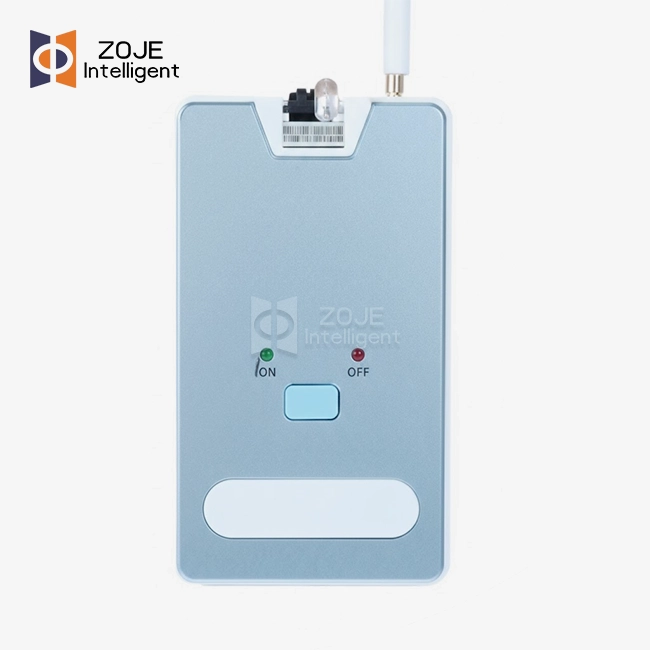
Parking guide configuration tool
2.Industrial Parking Guide Tool | Bluetooth + Infrared
3.Stable Low-power Operation
4.Easy Parking Probe Setup
5.Accurate Ultrasonic Data Configuration
6.Wireless Bluetooth Hassle-free Pairing
7.Stable RF signal .Anti-interference
8.24/7 tech support and service

- Face to Face Discussion
- Quality Assurance
- 24/7 Customer Service
Product Introduction
Parking Guide Configuration Tool for Intelligent Parking Systems — Fast Setup, Accurate Calibration
ZOJE Intelligent Technology makes the parking guide configuration tool ZOJE-T02-T. It comes as a hardware interface plus a software utility. Together they set up, calibrate, and run parking guidance systems. Bluetooth and infrared links are both supported. The unit connects ultrasonic sensors, zone controllers, and signage to a central management server. Each subnet can carry 65,000+ nodes. Batch firmware updates run with execution confirmation in under 5 seconds per batch. Production follows ISO 9001:2015. A 2-year warranty ships with it.
What Is This Product and Why Does It Matter?
Older parking systems need a manual DIP switch tweak on every device on-site. That work is slow. Mistakes happen often. Scaling it across a large facility is hard.
Digital addressing, logical mapping, and wireless Bluetooth pairing take the place of that method in the ZOJE-T02-T. Hundreds of sensors can be configured by an installer with no physical access to each device.
Three deployment challenges it directly addresses:
- High commissioning time: setup in big parking structures can eat up hours. Batch provisioning and auto-discovery cut those hours down.
- Topology mapping errors: every sensor shows up on a digital floor plan. Physical addressing mistakes get caught this way, before they turn into system failures.
- False occupancy readings: pillars or a car parked next door can cause bad readings. Fine sensitivity adjustment and exclusion zones fix those errors.
Key Features of the ZOJE-T02-T
Wireless Bluetooth Pairing
The tool pairs directly with parking probes and controllers over Bluetooth — no cables, no adapters — even across multi-level garages.
Ultrasonic Detection Configuration
You can change the detection sensitivity thresholds and exclusion zones right in the interface. That gets rid of false readings from structural features, such as low-hanging beams or floor reflections.
RF Signal Stability in Enclosed Environments
This RF communication layer is built to stand up to signal noise in underground or enclosed parking areas.
Low-Power Operation
Power draw stays low and steady. Crews can therefore run long commissioning sessions in big facilities without stopping to recharge the unit.
Infrared + Bluetooth Dual Communication
Installers get more room to work when a Bluetooth signal runs into obstacles. Two channels make that possible.
Technical Specifications
| Parameter | Specification |
|---|---|
| Model | ZOJE-T02-T |
| Communication Mode | Bluetooth/Infrared |
| Infrared Distance | ≤2m |
| Operation Voltage | DC 5V |
| Power Consumption | <0.5W |
| Compatible Devices | Android (Android 9.0+) |
Application Scenarios
Airport Parking with Multi-Level Integration
Video-based guidance systems that tie into flight databases are handled by the parking guide configuration tool. Zones switch on the fly between Public, Valet, and Authorized Personnel modes. Setup also covers camera masking zones, which keep luggage carts and pedestrians out of occupancy detection.
Mega-Mall Mixed-Use Parking
The tool splits parking areas into separate groups. VIP spots, EV charging bays, and spaces for disabled drivers each get their own segment. LED color codes are set per group. Green means available. Red means occupied. Blue means disabled, Magenta means VIP. Technicians can also test the link to outdoor totalizers. That check shows whether entrance counts match the sensor data inside.
Smart City On-Street Parking
Geomagnetic setups and camera-pole systems need calibration against background interference. Heavy traffic and subway vibrations are the usual culprits. Technicians set debounce times, which are the delays before a sensor activates. A delay stops short bursts of traffic from being logged as parked cars.

Quality Control Process for the Parking guide configuration tool
Each unit goes through a structured quality process before shipping.
Communication Stability Test
During a full network scan, the tool has to keep a valid handshake with 99.9% of connected devices. Ghost sensors then stay out of the system.
Bulk Operation Latency Test
Configuration commands are sent to batches of 500+ sensors. Execution confirmation must complete in under 5 seconds per batch.
Error Log Accuracy Verification
Fault conditions such as "Sensor Blinded," "Controller Offline," and "Duplicate IP" are simulated to confirm accurate diagnostic reporting.
Security Penetration Testing
The configuration stream gets checked with a Parking guide configuration tool using AES-128/256 encryption. That stops devices from connecting without permission.

Customization and OEM/ODM Options
Hardware and software can both be customized on the ZOJE-T02-T by ZOJE. Need special protocols, your own branding, or changes to the interface? OEM and ODM cooperation is open to you.
Standard products leave the warehouse in 5–7 days. For customized versions, plan on 10–15 days. You can ship by sea freight or air freight. DDU and DDP trade terms are both supported.
FAQ
Q: What does This product do on-site?
A: It wakes up the parking sensors, calibrates them, and maps each one to a central server through digital addressing. Manual DIP switch tweaks are gone. In their place you get wireless Bluetooth setup and floor-plan mapping on screen.
Q: Can the tool work offline without a network connection?
A: Offline Project Creation is supported by the tool. You can design maps and assign logical addresses off-site. Once the devices are connected to the site LAN, upload the full configuration to the physical units.
Q: Sensors report "Occupied" while the spaces are empty. What do I do to fix that?
A: Go to the device settings and run "Empty Stall Calibration". You can also adjust the ultrasonic threshold. With video sensors, redraw the detection zone so pillars and floor reflections sit outside it, and do that right in the tool interface.
Q: I swapped out a sensor that was faulty. Now I get a "Device Mismatch" error. Why?
A: Run the "Replace Device" function. It puts the new MAC address in place of the old Distinct ID. Your logical mapping stays as it was. Calibration settings stay too, so you don't have to set up the whole zone again.
Q: Some zones won't take a batch firmware update. What causes that?
A: Most of the time this points to congestion on the network, or to RS485 signal loss on long cable runs. Open the diagnostic tab and look at the packet re-transmission rates. If they come back high, cut the batch size. Update 10 devices at once rather than 50, for example.
Q: Is there a way to export configuration data and keep it as a backup?
A: The whole topology can be pulled out of the tool as XML or JSON. You get a backup file that helps with system recovery. Save it every time a major maintenance cycle is done.
Contact Us
Have a project that requires the parking guide configuration tool? Reach out to our team at info@zoje-tech.com: we respond within one business day.
Send Inquiry
You may like